SMS templates
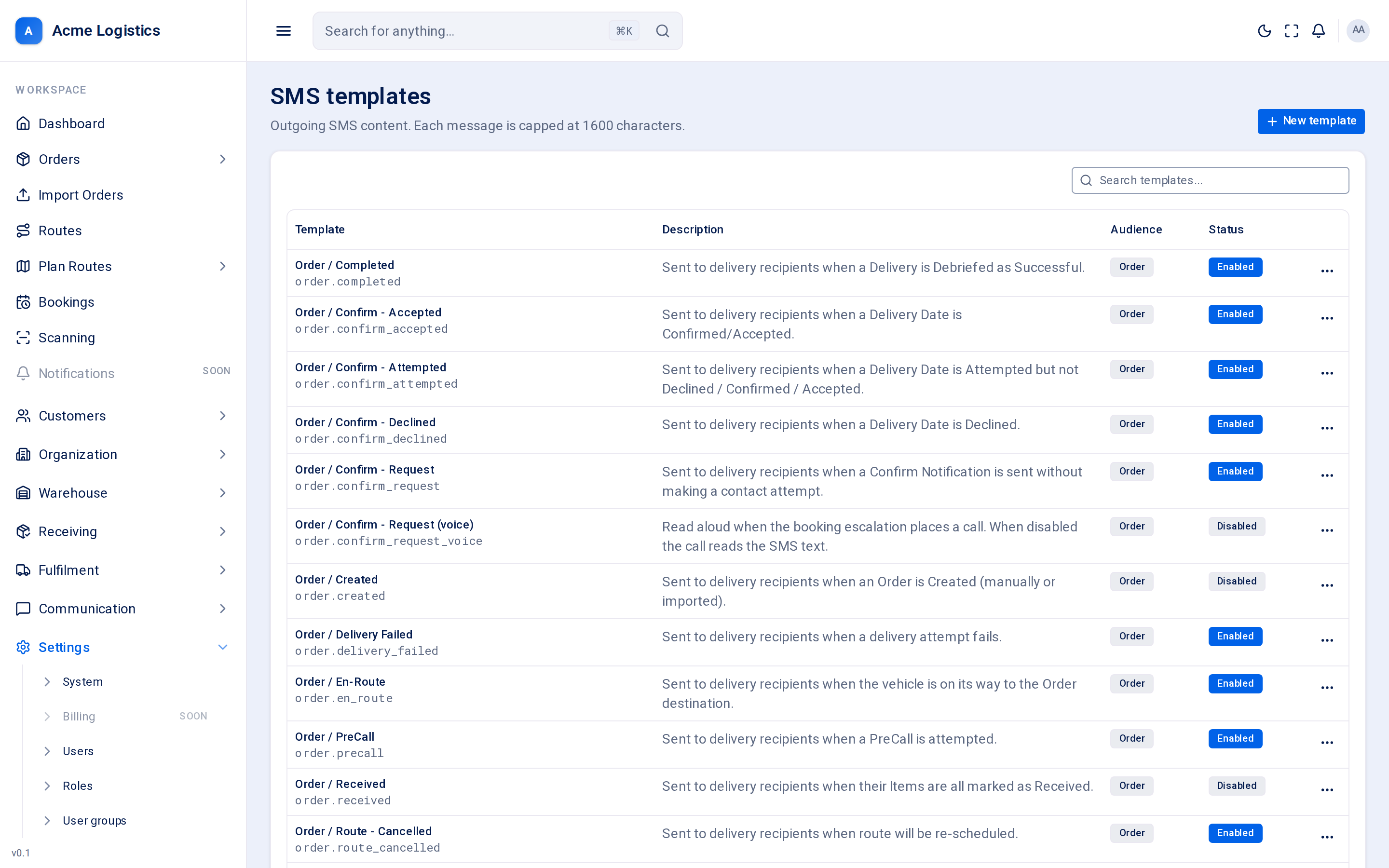
Every text message Tracovy sends to a recipient - asking them to choose a delivery date, confirming the date, telling them a delivery failed - comes from a template on this screen. You can change the wording, switch a message off, and see how many SMS segments (and so how much credit) each message uses.
Where to find it: Settings > SMS templates Who can use it: anyone who can view templates (“View notification templates”) can open the list and the editor; you need “Manage notification templates” to create templates and to restore defaults.
When you use this
Section titled “When you use this”- Put your own wording on the texts your recipients receive.
- Switch off a text you do not want to send (for example “Order / Created”).
- Shorten a message so it fits in one segment and costs less.
- Change what the automated booking call says out loud.
The template list
Section titled “The template list”The list is grouped by who receives the message. Use the search box to find a template by its name or code.
| Column | What it means |
|---|---|
| Template | The template’s name and, underneath, its code (for example order.confirm_request). Tracovy finds the template by its code when something happens, so built-in codes never change. |
| Description | When the message is sent and to whom. |
| Audience | Who receives it. Built-in SMS templates all go to the Order recipient - the person receiving the delivery. |
| Status | Enabled messages are sent when their event happens. Disabled messages are not sent at all. |
Each code can have an email part and an SMS part, and each part has its own switch. Switching off the SMS here does not switch off the email with the same code, and the other way round.
Editing a template
Section titled “Editing a template”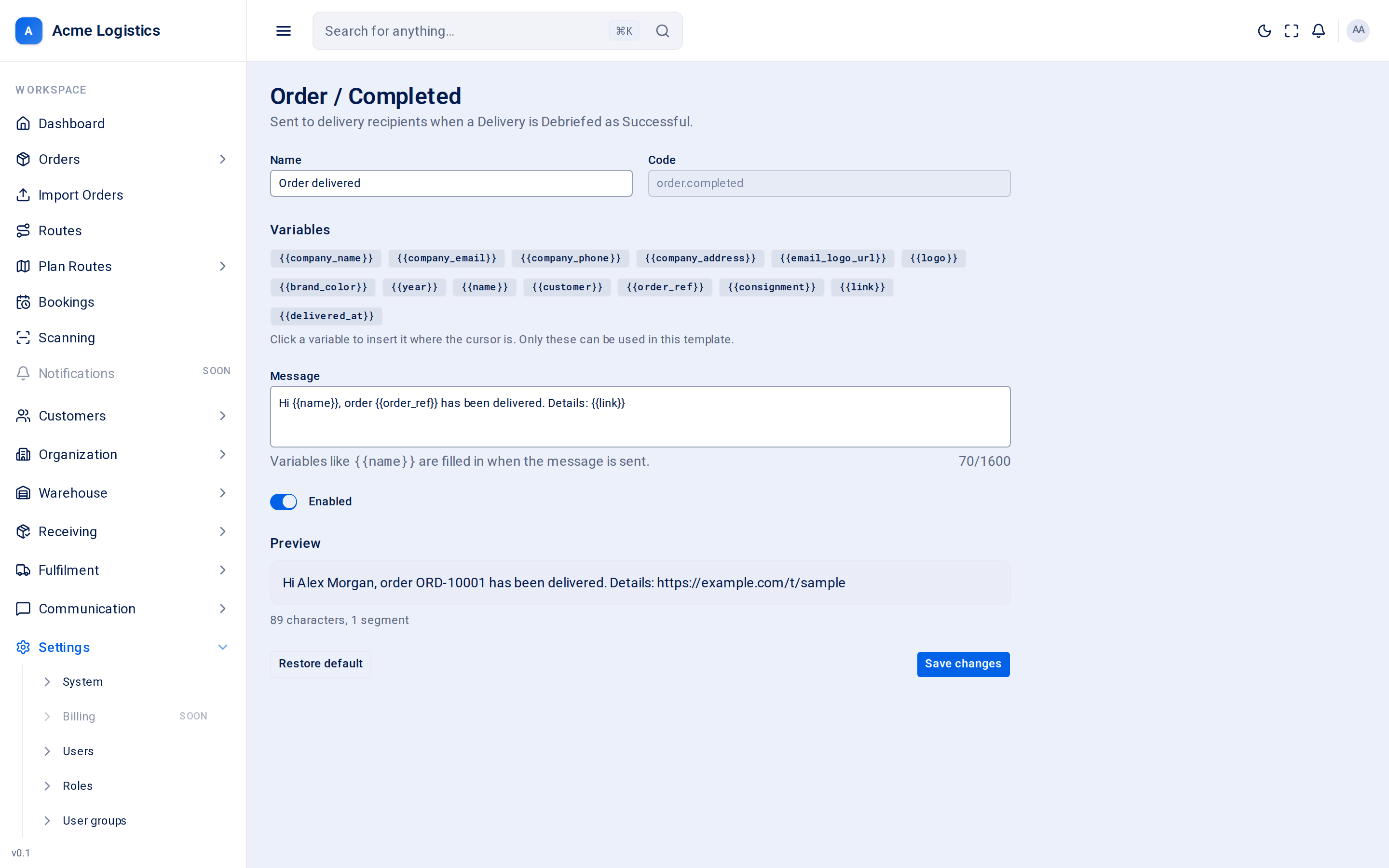
| Field | What it means | Required | Why it matters |
|---|---|---|---|
| Name | The name you see in the list. | Yes, up to 255 characters | Only for you; recipients never see it. |
| Code | The template’s identifier, such as order.confirm_accepted. |
Yes, up to 100 characters, unique | Tracovy sends a template by its code. You choose it when you create a template and it cannot be changed afterwards. |
| Variables | Clickable chips for every placeholder this template can use, such as {{name}} or {{link}}. |
- | Clicking a chip inserts it where your cursor is. On built-in templates only these placeholders are allowed; anything else is rejected when you save, so a typo never reaches a recipient as {{typo}}. |
| Message | The text of the SMS. | Yes, up to 1600 characters | This is exactly what the recipient reads, with placeholders filled in. The counter under the box shows how many of the 1600 characters you have used. |
| Enabled | Whether the message is sent. | - | Switch it off to stop the text without losing your wording. |
Preview, characters and segments
Section titled “Preview, characters and segments”Below the message you see a Preview: the message with sample values filled in (a made-up recipient, order and link), and a line such as “142 characters, 1 segment”. It updates a moment after you stop typing.
Phones send long texts as several segments joined together, and each segment is billed separately. How much fits in a segment depends on the characters you use:
| Encoding | When it is used | Characters per segment |
|---|---|---|
| Standard SMS alphabet (GSM-7) | The message uses only plain letters, digits and common punctuation. | 160 in a single message, 153 per segment when split |
| Unicode (UCS-2) | The message contains any character outside the standard alphabet - for example an emoji, a curly quote or certain accented letters. | 70 in a single message, 67 per segment when split |
A few symbols, such as { } [ ] ~ ^ | \ and the euro sign, are in the standard alphabet but count as two characters.
The preview warns you when:
- The message will be sent as more than one segment and billed for each one.
- The message contains characters outside the standard SMS alphabet, so segments hold fewer characters.
If the preview says it “couldn’t render a preview”, check the message for an unknown placeholder.
The built-in messages are written to fit in one standard segment before placeholders are filled in. A long recipient name or link can push a message into a second segment, so leave some room.
The voice template (order.confirm_request_voice)
Section titled “The voice template (order.confirm_request_voice)”Order / Confirm - Request (voice) is not sent as a text. When a recipient does not answer the booking request, Tracovy escalates: first a text, then an email, then an automated phone call. This template is the script read aloud on that call.
- It is disabled for a new workspace. While it is disabled, the call reads out the text of the SMS booking request (
order.confirm_request) instead. - Enable it and write words meant to be heard, not read: no links, short sentences, and the reference spelled out where it helps. The default asks the recipient to check their text messages to choose a date.
- It uses the same placeholders as the other order templates (
{{name}},{{customer}},{{order_ref}}and so on).
Buttons and actions
Section titled “Buttons and actions”| Action | What it does |
|---|---|
| New template | Opens a blank form to create your own template. Nothing sends a template you create until a feature uses its code, so you rarely need this. |
| Edit (row menu, or click the name) | Opens the template in the editor. |
| Delete (row menu) | Only for templates you created yourself. It is removed straight away, without a confirmation. Built-in templates cannot be deleted - disable them instead. |
| Restore default | Shown on built-in templates. After you confirm, it puts the message back to Tracovy’s original wording. Your edits are lost; whether the template is enabled stays as it is. |
| Save changes / Create template | Saves the template and returns to the list. Unknown placeholders are reported under the Message field. |
There is no Send test button for SMS. Check the preview, and if you need to see it on a phone, send it to yourself through a real booking on a test order.
Tips and common mistakes
Section titled “Tips and common mistakes”- Keep booking texts short and put
{{link}}near the end, so it is not cut off on small screens. - A message that says “Hi ,” means the order had no recipient name. Write wording that still reads well when a value is empty.
- Disabled is safer than deleting text: you can switch it back on later.
- Text messages are paid from your communication credit. A two-segment message costs twice as much as a one-segment message, for every recipient.
Related
Section titled “Related”- Email templates
- System settings - company name and phone used in messages