Email templates
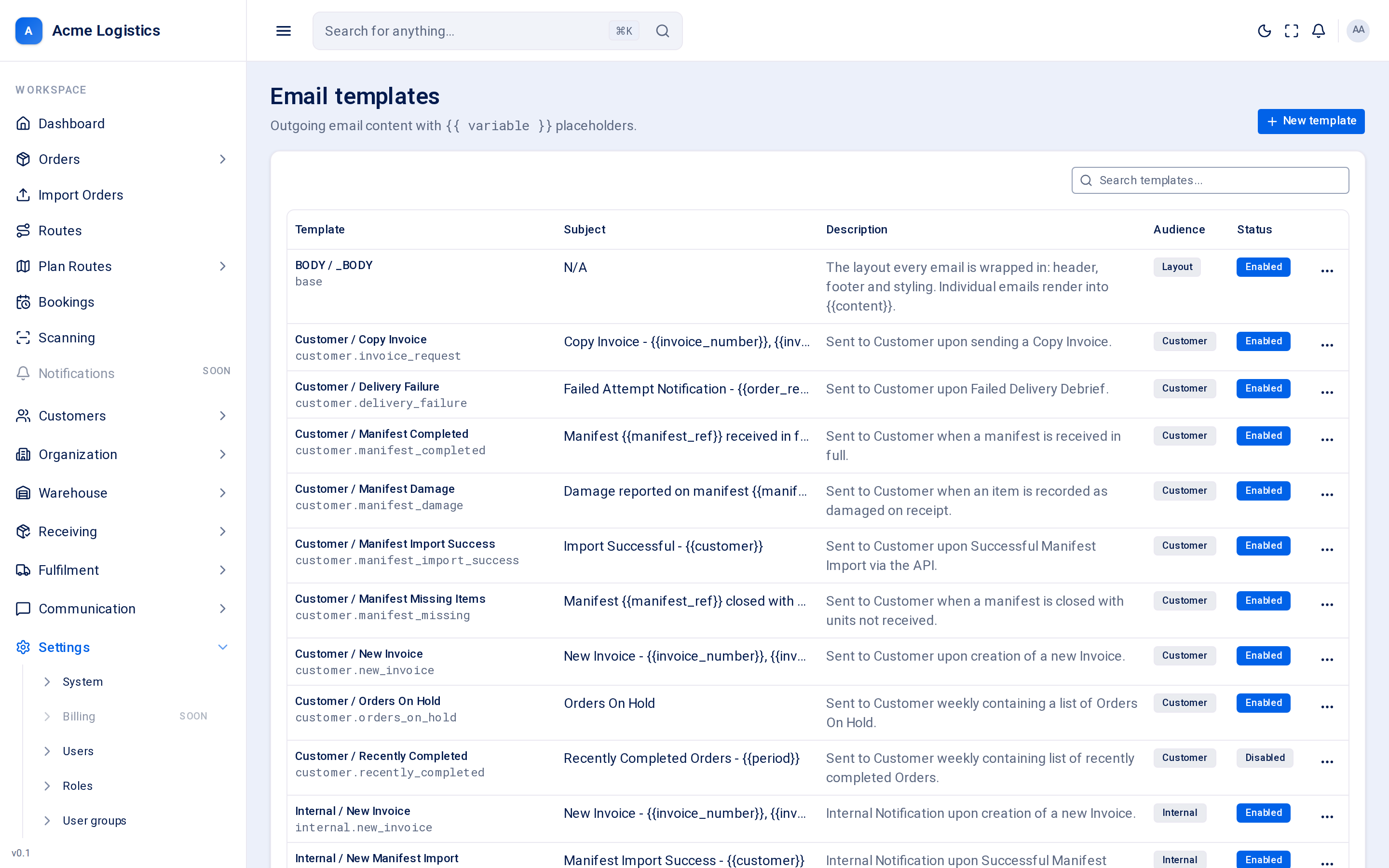
Every email Tracovy sends - a delivery date confirmation, a failed delivery notice, a weekly list of orders on hold - comes from a template on this screen. You can change the wording, switch an email off, and preview exactly what the recipient will see.
Where to find it: Settings > Templates > Email Who can use it: anyone who can view templates can open this screen; you need permission to manage templates to edit, test or restore them.
When you use this
Section titled “When you use this”- Put your own wording on the emails your recipients receive.
- Switch off an email you do not want to send (for example “Order / Created”).
- Change the shared layout: your logo, colours and footer.
- Check how an email looks before your customers see it.
The template list
Section titled “The template list”Templates are grouped by who receives them: the layout first, then emails to your customers, your internal staff, suppliers, and the order recipient (the person receiving the delivery).
| Column | What it means |
|---|---|
| Template | The template’s name and its code. The code is how Tracovy finds the template when something happens, so it never changes for built-in templates. |
| Subject | The email subject line. Words in {{double braces}} are filled in when the email is sent. |
| Description | When the email is sent and to whom. |
| Audience | Who receives it: Layout, Customer, Internal, Supplier or Order. |
| Status | Enabled emails are sent when their event happens. Disabled emails are not sent at all. |
Editing a template
Section titled “Editing a template”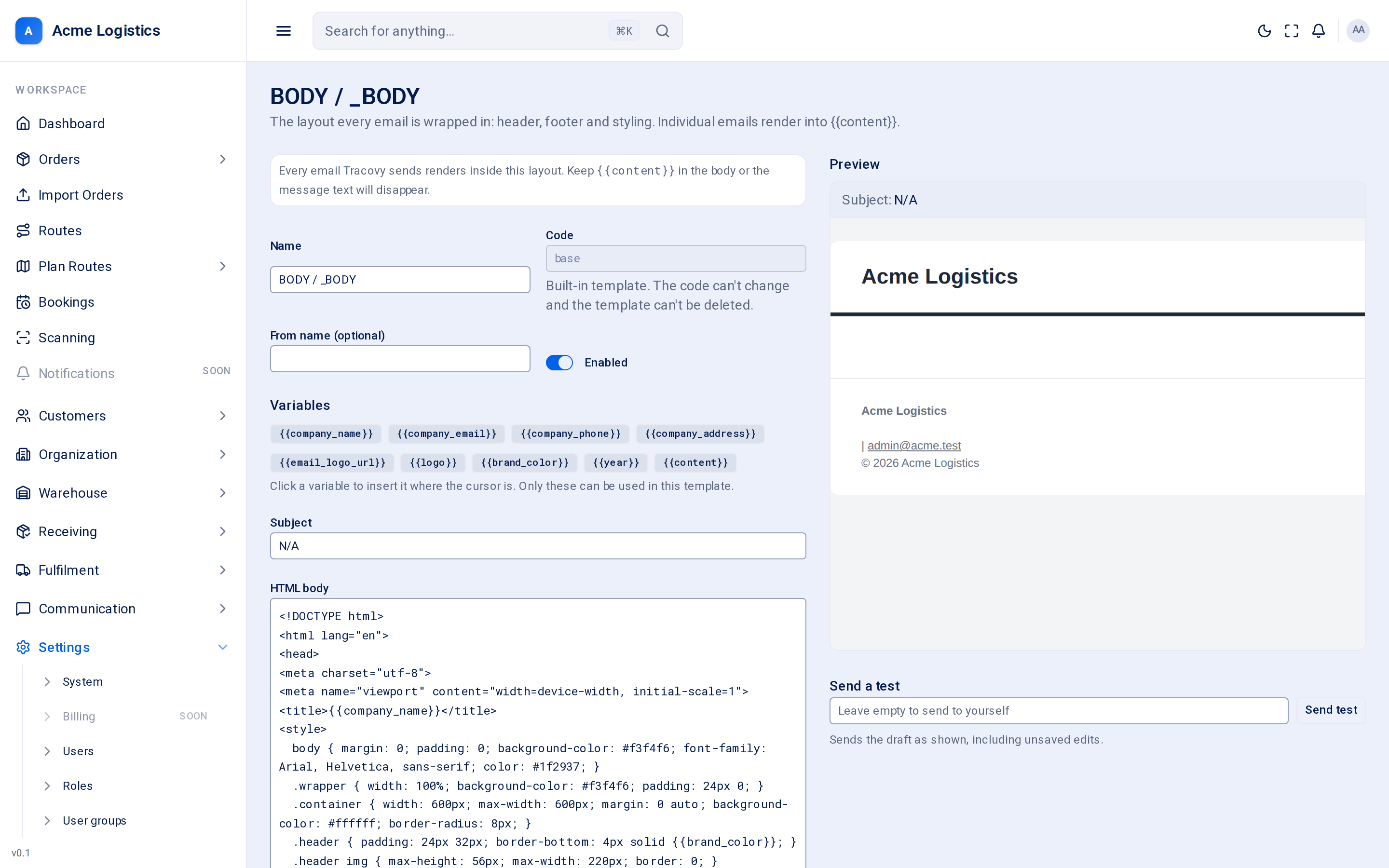
| Field | What it means | Required | Why it matters |
|---|---|---|---|
| Name | The name you see in the list. | Yes, up to 255 characters | Only for you; recipients never see it. |
| Code | The template’s identifier, such as order.confirm_accepted. |
Yes | Tracovy sends a template by its code. You choose it when you create a template and it cannot be changed afterwards. Only built-in codes are ever sent; a template with a code you made up is saved but nothing sends it. |
| Subject | The subject line of the email. | Yes, up to 255 characters | It is the first thing the recipient reads. Placeholders such as {{customer}} work here too. |
| From name (optional) | The sender name shown in the recipient’s inbox. | No | Leave it empty to use your company name. The email address itself is always Tracovy’s verified sender; replies go to your company email. |
| HTML body | The content of the email, in HTML. | Yes | For a normal email this is only the middle part: it is placed inside the layout (logo, colours, footer). |
| Plain-text fallback | A text-only version for email apps that do not show HTML. | No | Leave it empty and Tracovy builds one from the HTML body. |
| Variables | Clickable chips for every placeholder this template can use. | - | Clicking a chip inserts it where your cursor is. Only these placeholders can be used; anything else is rejected when you save, so a typo never reaches a customer. |
| Enabled | Whether the email is sent. | - | Switch it off to stop the email without losing your wording. |
| Attach the PDF | Shown only on emails that can carry a document (proof of delivery, invoice). | - | Turn it off to send the email without the PDF. |
The layout (BODY / _BODY)
Section titled “The layout (BODY / _BODY)”The template with code base is not an email on its own. It is the frame every email is placed in: the header with your email logo, your colours and the footer with your company details. The individual email appears where the layout says {{content}}.
Your logo comes from Settings > System > Email notifications. If you have not uploaded one, your company name is shown instead.
Buttons and actions
Section titled “Buttons and actions”| Action | What it does |
|---|---|
| Preview | Shown beside the editor and updated as you type, using sample values (a made-up recipient, order and date). It is exactly what the recipient sees, inside your layout. |
| Send test | Sends the current wording, with sample values, to the address you enter - or to yourself if you leave it empty. The subject starts with [TEST]. Use it to check the email in a real inbox. |
| Restore default | Puts the subject and body back to Tracovy’s original wording. Your edits are lost; whether the template is enabled stays as it is. |
| Save changes | Saves your edits. Unknown placeholders are reported under the field. |
| Delete | Only for templates you created yourself. Built-in templates cannot be deleted - disable them instead. |
Tips and common mistakes
Section titled “Tips and common mistakes”- Turning an email off is safer than deleting text from it: you can switch it back on later.
- After changing the layout, use Send test and open the email on your phone too.
- An email that says “Hello ,” means the recipient had no name on the order - keep wording that still reads well when a value is empty.
Related
Section titled “Related”- SMS templates
- System settings - email logo and internal recipients
- Notifications: which email is sent when