Numbers
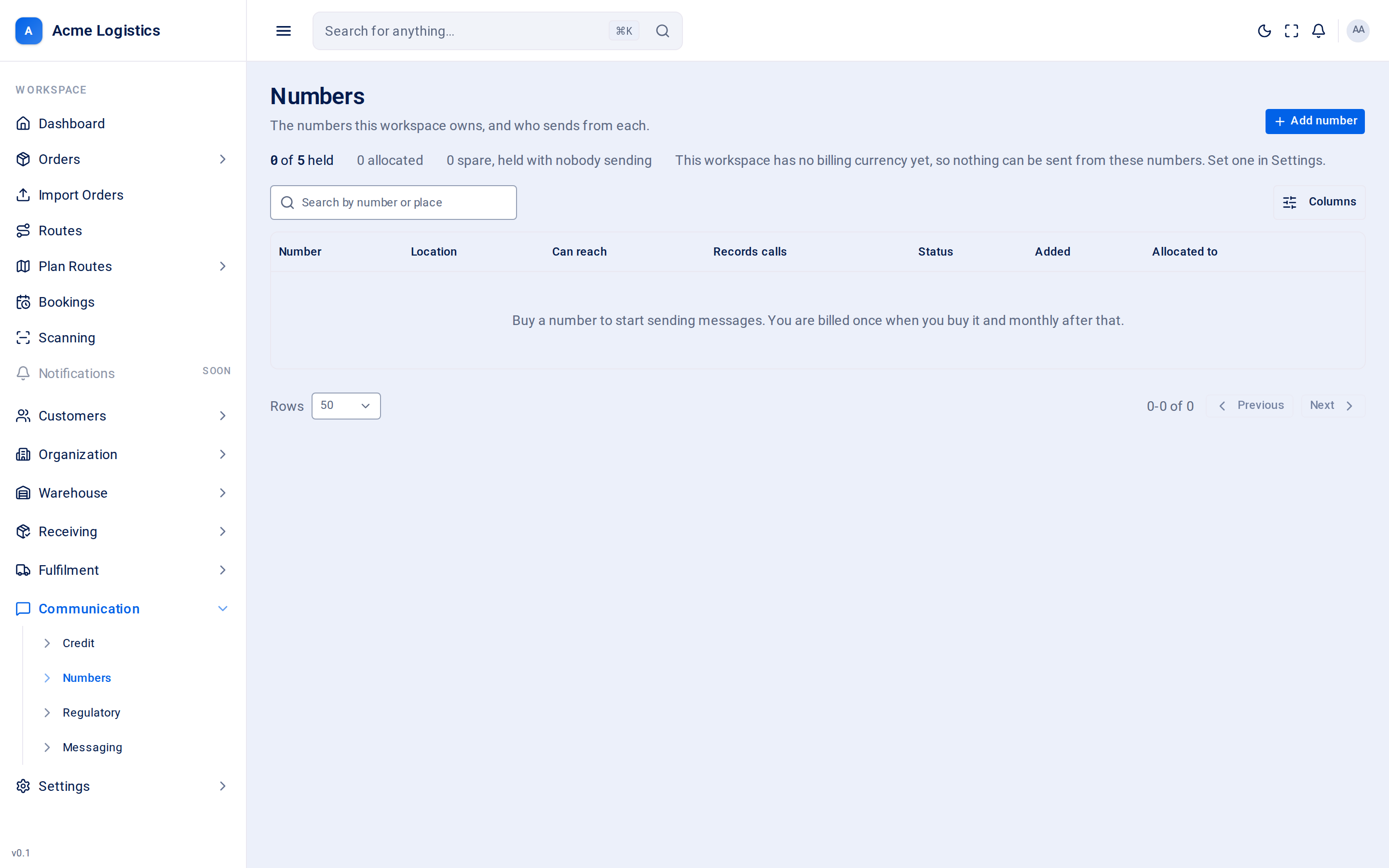
Your workspace needs at least one phone number to text recipients and to call them from the browser. This screen lists the numbers you own, lets you add more, and controls what each one may do and who uses it.
Where to find it: Communication > Numbers Who can use it: permission to view phone numbers to see the list. Adding a number needs permission to manage billing and subscription. Changing Can reach and Records calls needs permission to manage phone number settings. Choosing who sends from a number needs permission to view and manage users.
When you use this
Section titled “When you use this”- Add your workspace’s first number so delivery texts can go out.
- Give a member of staff their own number to call from.
- Stop a number calling or texting countries you never deliver to.
- Switch call recording on or off.
- See every call and text from one number.
The summary line
Section titled “The summary line”Above the table: how many numbers you hold (and, if you can manage billing, of how many your plan allows), how many are allocated to people, and how many are spare, held with nobody sending. It also warns you when:
- you are using every number your plan includes - Contact support replaces Add number;
- your workspace has no billing currency, so nothing can be sent from these numbers until one is set in Settings > System.
Columns
Section titled “Columns”| Column | What it means |
|---|---|
| Number | The phone number in international form, for example +447700900123. |
| Location | The town and country of the number, or only the country for a mobile number. |
| Can reach | The countries this number may call and text. Anywhere means no limit set by you. |
| Records calls | Whether calls from this number start recording automatically. |
| Status | Where the number is in its set-up. See Statuses below. |
| Added | When the number was added. |
| Allocated to | The people who call from this number, or Unassigned. |
The search box finds numbers by digits or place. You can sort by number, location, status and date added.
Changing a number from the list
Section titled “Changing a number from the list”| Control | What it does | Why it matters |
|---|---|---|
| Can reach | Opens a country list with search. Tick or untick countries; each change saves at once. With nothing ticked the number can reach anywhere your provider allows. | Stops calls and texts to countries you never serve, which protects you from expensive mistakes and fraud. Leaving it on Anywhere is the same as no limit. |
| Records calls | Switch. Saves at once. | Sets whether calls from this number start recording. Whoever is on the call can still start or stop recording during it. Off by default. |
| Allocated to | Opens a list of people. Tick or untick; each change saves at once. A person already on another number is marked “moves from another number”. | A person sends from one number at a time, but many people can share one number - a depot desk line, for example. Only Ready numbers can be allocated. |
Buttons and actions
Section titled “Buttons and actions”| Action | What it does |
|---|---|
| Add number | Opens Add a number. Shown when you can manage billing and are below your plan’s limit. |
| Contact support | Shown instead of Add number when every number in your plan is in use. Opens an email to Tracovy support to raise the limit. |
| Open (row menu) | Opens the number’s own page. |
| View calls (row menu) | Opens the call log filtered to this number. |
| Add regulatory details | Shown under Awaiting carrier approval. Opens Regulatory details. |
Adding a number
Section titled “Adding a number”Numbers are included in your subscription, so adding one costs nothing extra. Every number offered can make calls and send texts unless shown otherwise.
| Field | What it means | Required | Why it matters |
|---|---|---|---|
| Country | Two-letter country code, for example GB. Filled in from your workspace’s country if you can read settings. The hint under it names the country, and corrects UK to GB. |
Yes | Decides which numbers are offered and which regulator’s rules apply. Recipients are more likely to answer a local number. |
| Digits | Digits you would like in the number. | No, 3 to 10 digits to filter | Leave it empty to browse the country. Fewer than 3 digits are ignored. |
| Match | Starts with, Contains or Ends with. | - | How the digits are matched. |
Each number offered shows its location and icons for calling and texting. Click Add this number to take it. Load more shows further numbers when the first page was full.
Warnings you may see while adding:
- This country needs regulatory details within 2 days of buying. You can add the number now and it works meanwhile, but if the regulator does not receive your details within 2 days the provider cancels it. After adding, the sheet offers Add regulatory details, or Buy another first.
- A US, CA or IN number cannot send until its registration completes, which takes days. It is yours and counts against your plan while it waits.
Statuses
Section titled “Statuses”| Status | What it means |
|---|---|
| Being set up | The order with the phone provider is in progress. |
| Awaiting carrier approval | The number is yours but cannot be used until the regulator approves your details. Use Add regulatory details. |
| Ready | The number can call and text. |
| Suspended | The number has been stopped. |
| Released | The number has been given back. |
| Setup failed | The order failed. The number was not added. |
The number’s own page
Section titled “The number’s own page”Where to find it: Open in a number’s row menu.
The header shows the number, where it is and when it was added, with All numbers to go back. A card shows:
| Setting | What it means |
|---|---|
| Status | The number’s status, with icons for whether it can make calls and send texts. |
| Can reach | As in the list. Editable with permission to manage phone number settings. |
| Records calls | As in the list. Editable with the same permission. |
| Allocated to | Who calls from it, or Nobody. Change it from the list. |
Below are two tabs:
- Calls - every call from this number, with the same columns and Redial as the call log.
- Messages - every text sent from this number. Needs permission to view recipients.
| Column (Messages) | What it means |
|---|---|
| When | When the text was sent. |
| To | The number it was sent to. |
| Message | The text itself. |
| Status | queued or sent (on its way), delivered, failed, or blocked with the reason: balance (not enough credit), market (Tracovy has no price for that country yet), no number (the workspace has no Ready number that can text), opted out (the recipient is on the opt-out list), invalid number, destination (a country this number may not reach) or unbilled (the workspace has no billing currency). A reason from the provider may be shown underneath. |
| Parts | How many parts a long message was split into. Each part is charged. |
| Cost | What the text cost. |
Tips and common mistakes
Section titled “Tips and common mistakes”- Set Can reach to the countries you deliver in as soon as you add a number.
- Check local law before switching Records calls on. Tell the person they are being recorded, or record only when they agree.
- A number stuck on Awaiting carrier approval needs your regulatory details - it will not fix itself.