Scheduling settings
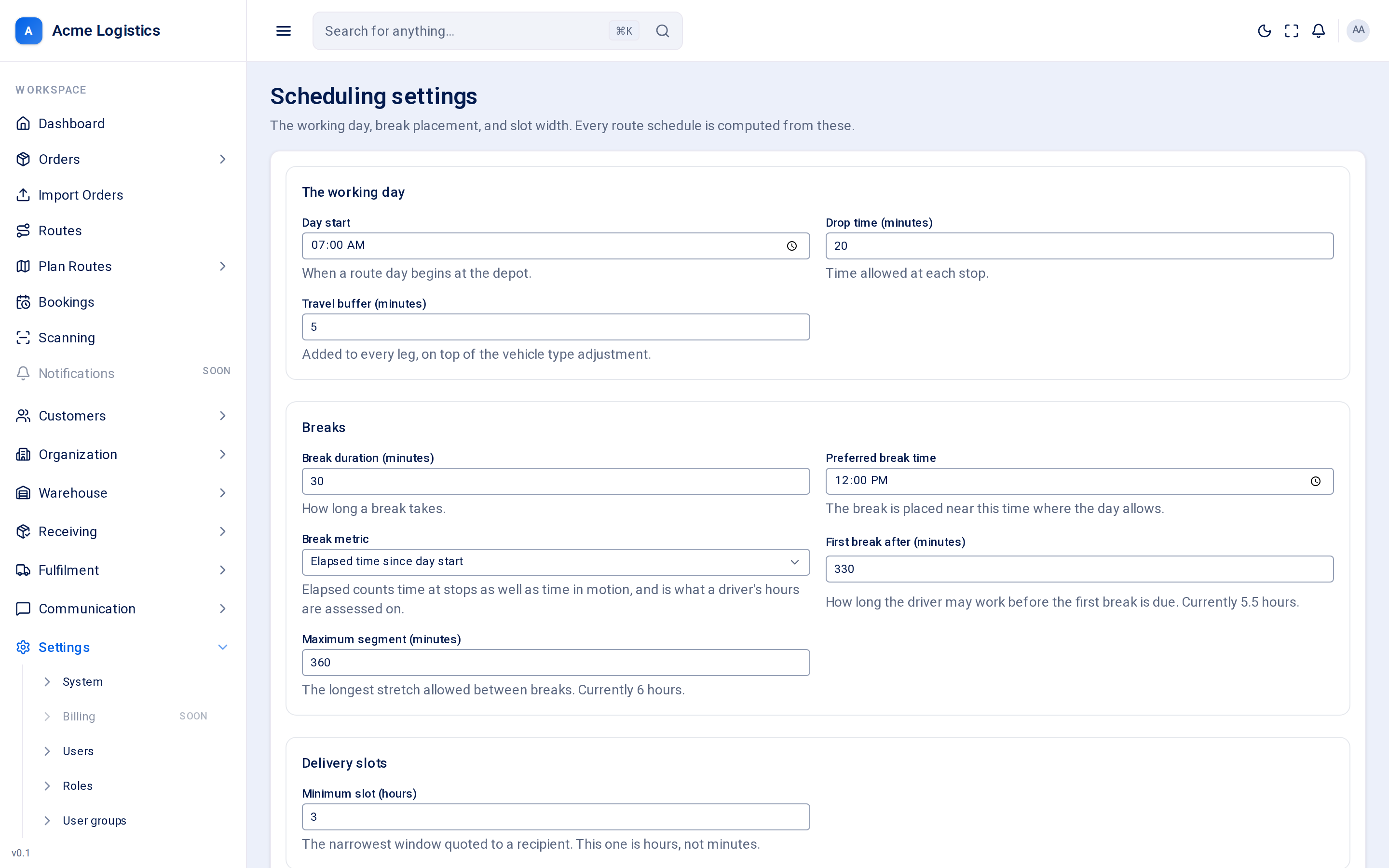
Scheduling settings describe your working day: when vans leave, how long a drop takes, when drivers take breaks, and how narrow a delivery window you are willing to promise. Tracovy uses them to work out the arrival time at every stop on every route, and the window each recipient is told.
Where to find it: Settings > Scheduling Who can use it: “View workspace settings” to see them; “Manage workspace settings” to change them. By default only Administrators can change them.
When you use this
Section titled “When you use this”- Setting up your workspace to match how your drivers really work.
- Your drops take longer than planned, so schedules keep running late.
- You want to quote recipients a narrower or wider delivery window.
The working day
Section titled “The working day”| Field | What it means | Required | Why it matters |
|---|---|---|---|
| Day start | When a route day begins at the depot. Starts at 07:00. | Yes | The first stop’s time is worked out from here. No delivery window quoted to a recipient starts before it. |
| Drop time (minutes) | Time allowed at each stop. Starts at 20. | Yes, 0 to 480 | Added for every stop. Too low and every route runs late; too high and vans finish early with spare capacity. |
| Travel buffer (minutes) | Extra minutes added to every leg between stops. Starts at 5. | Yes, 0 to 120 | Covers parking and finding the door. It comes on top of the vehicle type’s travel time adjustment. |
Breaks
Section titled “Breaks”| Field | What it means | Required | Why it matters |
|---|---|---|---|
| Break duration (minutes) | How long a break takes. Starts at 30. | Yes, 0 to 240 | Added to the schedule wherever a break is placed, pushing later stops back. |
| Preferred break time | The time of day you would like breaks taken. Starts at 12:00. | Yes | The break is placed near this time where the day allows. |
| Break metric | How working time is counted for breaks: Elapsed time since day start or Driving time only. Starts on Elapsed. | Yes | Elapsed counts time at stops as well as time driving, and is what a driver’s hours are assessed on. Driving time only counts time on the move. |
| First break after (minutes) | How long the driver may work before the first break is due. Starts at 330 (5 hours 30 minutes). | Yes, 1 to 1440 | A break is placed no later than this. The hint under the box shows the value in hours. |
| Maximum segment (minutes) | The longest stretch allowed between breaks. Starts at 360 (6 hours). | Yes, 1 to 1440 | On long days, further breaks are placed so no stretch is longer than this. |
Delivery slots
Section titled “Delivery slots”| Field | What it means | Required | Why it matters |
|---|---|---|---|
| Minimum slot (hours) | The narrowest delivery window quoted to a recipient. This one is in hours, not minutes. Starts at 3. | Yes, 1 to 24 | Tracovy works out each stop’s window from its planned arrival, rounding outwards so the van is never late for what the recipient was told, and never quotes a window narrower than this. A smaller number pleases recipients but is easier to miss. |
Opening hours
Section titled “Opening hours”The default opening hours for every customer that has no opening hours of its own (set on the customer).
| Field | What it means | Required | Why it matters |
|---|---|---|---|
| Opens | When deliveries can start. Starts at 07:00. | Yes | The route planner and route detail mark a stop in red when the van is due to arrive before this time. The mark is a warning only. |
| Closes | When deliveries must arrive by. Starts at 17:00. | Yes, and after Opens | A stop planned to arrive after this time is marked in red. |
The default applies every day of the week. To close a customer on some days, give that customer opening hours of its own.
What changes when you save
Section titled “What changes when you save”Every route schedule is calculated from these settings, so they affect arrival times, the delivery windows recipients are told, and break placement on routes worked out from then on. A window a recipient has already confirmed does not move when a schedule is recalculated.
Times are worked out in each depot’s own timezone (set on the depot).
Buttons and actions
Section titled “Buttons and actions”| Action | What it does |
|---|---|
| Save settings | Saves all the settings on the page. Errors are shown under the field. |
Tips and common mistakes
Section titled “Tips and common mistakes”- Change one thing at a time and watch a few days of routes before changing the next.
- Drop time is the setting most often wrong. Time a few real drops, including two-person and installation jobs, and use a realistic average.
- Minimum slot is in hours. Entering 30 thinking it is minutes is refused - the maximum is 24.
Related
Section titled “Related”- Vehicle types - travel time adjustment per vehicle class
- Delivery slots
- Depots - timezone and start point
- Adding a customer - a customer’s own opening hours