Roles and permissions
A role is a set of permissions. Every user has one role, and the role decides which screens they see and what they can change. Tracovy comes with eight roles; you cannot add or rename roles, but you can change which permissions each one has (except Administrator).
Where to find it: Settings > Roles Who can use it: “View roles” to see roles and their permissions; “Edit role permissions” to change them.
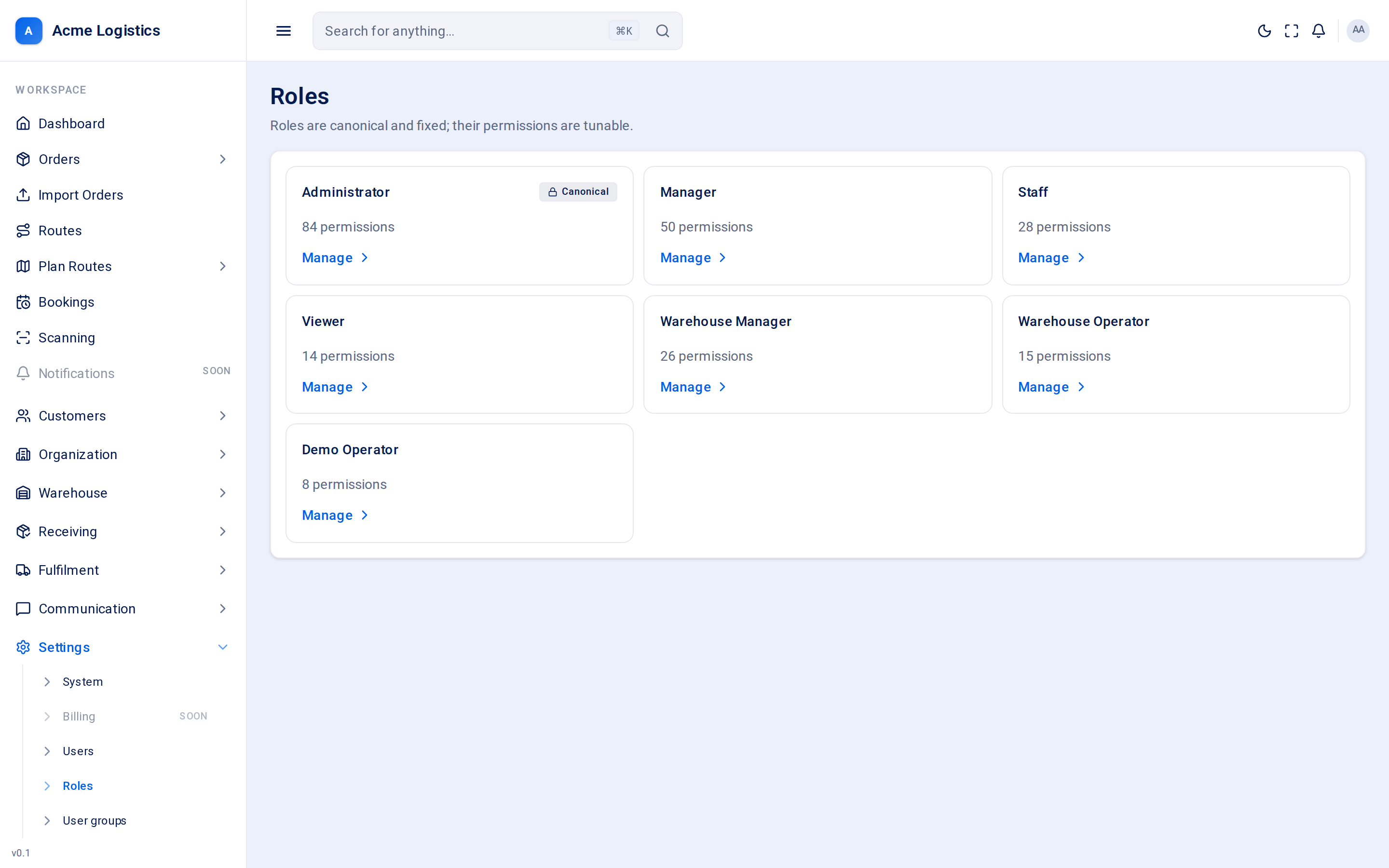
Screenshot coming soonThe roles screen with one card per role
When you use this
Section titled “When you use this”- Check what a role can do before giving it to a new user.
- Let your Staff role see something it cannot today, or take something away.
- Work out why a user cannot see a screen.
The built-in roles
Section titled “The built-in roles”| Role | Intended for | What it starts with |
|---|---|---|
| Administrator | The owner and the people who run the workspace. | Every permission. It cannot be edited, so you can never lock yourself out. Only an Administrator holds the security-sensitive permissions (API keys, webhooks, phone numbers, billing, user and role management, settings changes, price list changes, setting a different price on an order, and invoice numbering and VAT rates). |
| Manager | Office and transport managers. | Orders, deliveries, routes (including planning, reopening and route money), bookings, vehicles, customers, zones, reminders and scanning. Can view price lists, add charges to priced orders, and create, issue and send invoices. Can view, but not change, users, roles, templates and settings. |
| Staff | Office staff who take and look after orders. | Create and update orders and deliveries, manage recipients and customers, view routes, reminders, scanning and labels, and place calls. |
| Viewer | Anyone who needs to look but not touch. | Read-only access to orders, deliveries, routes, vehicles, depots, zones, recipients and customers. |
| Warehouse Manager | The person who runs the warehouse. | Stock, locations, receiving (including amending locked manifests), picking, packing, dispatch, loading, returns, labels and scanning. |
| Warehouse Operator | Warehouse floor staff. | Receive, put away, pick, pack, load and scan. Can view stock and locations but not change them. |
| Team Leader | Warehouse supervisors. | The Warehouse Manager’s access, without order prices or route money. |
| Finance | Accounts staff. | Read-only access like Viewer, with order and route money visible. Can also view price lists, add charges to priced orders, create, issue and send invoices, record payments, issue credit notes and export finance CSVs. |
The role screen
Section titled “The role screen”Click Manage on a role card to open it. The page shows how many permissions the role has, then one card per permission group. Each permission shows its code (for example orders:create) and a short description. Tick or untick permissions, then press Save permissions.
What each permission group allows
Section titled “What each permission group allows”The groups appear in alphabetical order by their code, as on screen.
| Group | Permissions | In plain words |
|---|---|---|
| Api_keys | api_keys:read, api_keys:write |
See and manage the API keys your systems use to send orders and manifests to Tracovy. Anyone holding a key can act as your business, so keep this to administrators. |
| Billing | billing:manage |
Manage your subscription, top up communication credit and handle the regulatory paperwork for phone numbers. |
| Bookings | bookings:read, bookings:write |
See and manage delivery bookings - the date offers sent to recipients and their answers. |
| Calls | calls:place |
Phone recipients straight from the browser. |
| Carriers | carriers:read, carriers:write |
See and manage carriers. |
| Charge_zones | charge_zones:read, charge_zones:write |
See and draw custom charge, advisory and avoidance zones that routes are checked against. |
| Charges | charges:write |
Add returns, storage, QC time and other charges to orders priced from the price list. |
| Credit_notes | credit_notes:write |
Create and issue credit notes. |
| Customer_products | customer_products:read, customer_products:write |
See and manage each customer’s product catalogue. |
| Customer_suppliers | customer_suppliers:read, customer_suppliers:write |
See and manage your customers’ suppliers and retailers. |
| Customer_users | customer_users:read, customer_users:write |
See and manage customer portal logins for your customers’ staff. |
| Customers | customers:read, customers:write |
See and manage your customers. |
| Damage | damage:report |
Record damage found when goods are received. |
| Deliveries | deliveries:read, deliveries:create, deliveries:update, deliveries:status:update |
See, create and update deliveries. deliveries:status:update lets a scanner device change a delivery’s status. |
| Delivery_slots | delivery_slots:read |
See the delivery slot catalogue (it cannot be edited). |
| Depots | depots:read, depots:write |
See depots; add, change and delete them. |
| Devices | devices:read, devices:write |
See and manage registered devices such as scanners. |
| Dispatch | dispatch:read, dispatch:operate |
See parcels waiting for dispatch, and stage and prepare them. |
| Finance | finance:export |
Export invoices, payments, statements and aging as CSV. |
| Invoices | invoices:read, invoices:write |
See invoices, credit notes, payments, statements and aging; create invoice drafts, issue and send invoices. |
| Invoicing | invoicing:publish |
Set invoice numbering, VAT rates, and supplier and bank details. |
| Labels | labels:print |
Print and reprint labels. |
| Loading | loading:operate |
Scan parcels onto a route’s vehicle. |
| Locations | locations:read, locations:write |
See and manage warehouse locations (bays, shelves). |
| Manifests | manifests:read, manifests:write, manifests:receive, manifests:amend |
See and create manifests, scan goods in against them, and amend a manifest after it is locked (a supervisor task). |
| Numbers | numbers:read, numbers:write |
See your phone numbers and change their settings. |
| Orders | orders:read, orders:create, orders:update, orders:delete, orders:import |
See, create, change and delete orders, and import orders in bulk from a file. |
| Packing | packing:operate |
Pack picked stock into parcels. |
| Payments | payments:write |
Record, allocate, reverse and refund payments. |
| Picking | picking:operate |
Pick stock for orders. |
| Pod | pod:write |
Upload proof of delivery. |
| Pricing | pricing:read, pricing:write, pricing:override |
See and edit price lists, price zones, serviceable countries and order property prices; set or remove a different price on an order. |
| Putaway | putaway:operate |
Put received stock away into locations. |
| Recipients | recipients:read, recipients:write |
See and manage recipients, and use messaging with them. |
| Reminders | reminders:read, reminders:write |
See and manage reminders. |
| Returns | returns:operate |
Scan returned goods back into stock. |
| Roles | roles:read, roles:write |
See roles and change which permissions they have (this screen). |
| Routes | routes:read, routes:write, routes:plan, routes:reopen, routes:financials:read |
See routes; plan and edit them; commit a plan from the planning map; reopen a finalised or dispatched route; see route income, profit, cost and zone charges. Route money is separate so warehouse staff can see the route without the figures. |
| Scans | scans:read, scans:write, scans:operate, scans:revoke |
See scan codes and scan history, issue scan codes, scan in the warehouse or office, and revoke a scan code. |
| Settings | settings:read, settings:write |
See and change workspace settings: system settings, scheduling settings and order properties. |
| Stock | stock:read, stock:write, stock:adjust, stock:import, stock:count |
See stock levels, placements and movements; manage stock; adjust quantities; import stock from a CSV file; do cycle counts. |
| Templates | templates:read, templates:write |
See and edit email and SMS templates. |
| Users | users:read, users:write |
See and manage users and user groups. |
| Vehicle_types | vehicle_types:read, vehicle_types:adjust |
See the vehicle type catalogue and tune each type’s travel time adjustment. |
| Vehicles | vehicles:read, vehicles:write |
See and manage your vehicles. |
| Warehouse | warehouse:read, warehouse:write |
See and manage the warehouse. |
| Webhooks | webhooks:read, webhooks:write |
See and manage webhook endpoints that tell your other systems when things happen. |
| Zones | zones:read, zones:write |
See and manage the service-area zones under Organization > Zones. Not the same as charge zones. |
Buttons and actions
Section titled “Buttons and actions”| Action | What it does |
|---|---|
| Manage | Opens a role to see or change its permissions. |
| Tick / untick a permission | Adds or removes it from the role. Nothing is saved until you press Save permissions. |
| Save permissions | Saves the role. Only shown if you can edit roles, and never on Administrator. |
Tips and common mistakes
Section titled “Tips and common mistakes”- When you give a role a “write” or “manage” permission, give it the matching “read” permission too, or the screen will not open.
- Users cannot be given a role whose permissions you do not hold yourself, so a Manager cannot make someone an Administrator.
- Keep API keys, webhooks, billing and role editing with Administrators.
Related
Section titled “Related”- Users
- User groups - groups decide who is told, not what they can do