Your profile
Your profile is your own account in this workspace. Everything here changes only your account - nothing you do on this screen affects anyone else.
Where to find it: click your initials or photo at the top right, then Profile. Who can use it: every signed-in user, for their own account.
When you use this
Section titled “When you use this”- Add a photo so colleagues recognise you.
- Set your timezone if you work in a different one from the office.
- Change your password, or switch on two-factor authentication.
- Sign out a device you have lost or no longer use.
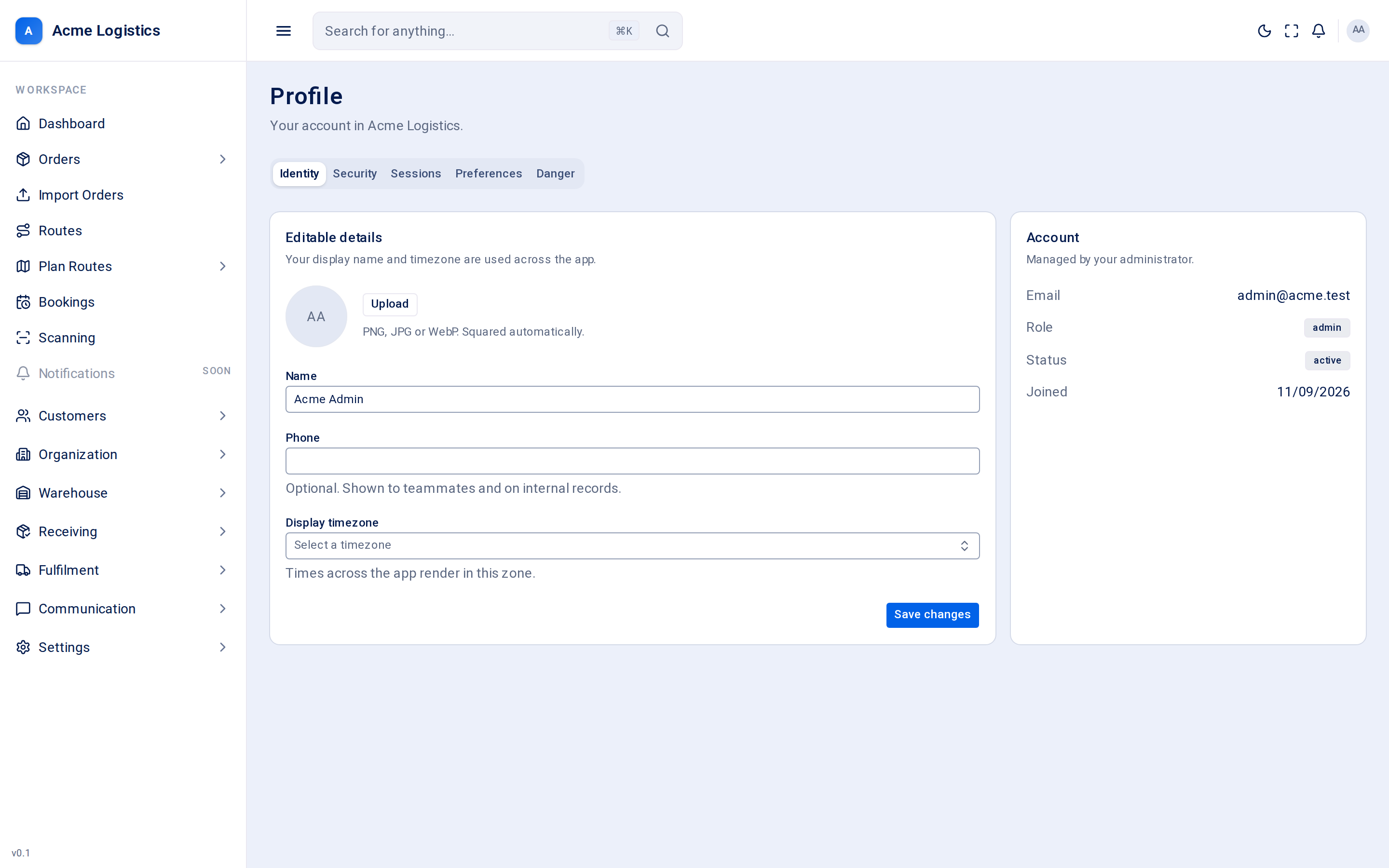
The screen has five tabs: Identity, Security, Sessions, Preferences and Danger.
Identity
Section titled “Identity”Editable details
Section titled “Editable details”| Field | What it means | Required | Why it matters |
|---|---|---|---|
| Photo | Your avatar. PNG, JPG or WebP, under 5MB. It is cropped to a square for you. | No | Shown in the header and wherever your name appears. Without one, your initials are shown. |
| Name | Your name. | Yes, up to 255 characters | Shown to colleagues and on records you create. |
| Phone | Your phone number. | No, up to 40 characters | Shown to teammates and on internal records. |
| Display timezone | The timezone times are shown in. | No | Every time across the app is shown in this zone for you. |
| Action | What it does |
|---|---|
| Upload / Change | Pick an image from your computer. It is saved straight away. |
| Remove | Deletes your photo; your initials are shown again. |
| Save changes | Saves name, phone and timezone. The header and menu update immediately. |
Account
Section titled “Account”Read-only details, managed by your administrator: Email, Role, Status and Joined (the date your account was created). To change your email or role, ask an administrator to edit your user in Settings > Users.
Security
Section titled “Security”Password
Section titled “Password”| Field | What it means | Required | Why it matters |
|---|---|---|---|
| Current password | The password you use now. | Yes | Proves it is really you making the change. A wrong one is reported under the field. |
| New password | Your new password. | Yes, at least 8 characters | Used from your next sign-in. |
| Confirm new password | The new password again. | Yes, must match | Catches typos. |
Update password saves it. You stay signed in on this device, but every other device is signed out - useful if you think someone else knows your old password.
Two-factor authentication
Section titled “Two-factor authentication”Two-factor authentication (2FA) adds a 6-digit code from an authenticator app on your phone to every sign-in.
| Step | What happens |
|---|---|
| Enable 2FA | Shows a QR code and a key you can type in by hand. |
| Scan and confirm | Scan the QR code with your authenticator app, then type the 6-digit code it shows into Verification code and click Turn on 2FA. Cancel stops without turning it on. |
| Save your recovery codes | A list of one-time recovery codes appears once only. Use Copy codes and store them somewhere safe, then click Done. Each code lets you sign in once if you lose your phone. |
| Turn it off | When 2FA is on, the card reads “Two-factor authentication is on”. Enter a current code (or a recovery code) under Code and click Disable. |
Sessions
Section titled “Sessions”Active sessions lists every place your account is signed in, with when it was signed in and when that sign-in expires.
| Action | What it does |
|---|---|
| Revoke | Signs that device out. It is logged out the next time it refreshes its sign-in, usually within minutes. |
Preferences
Section titled “Preferences”| Setting | Options | Why it matters |
|---|---|---|
| Theme | Light, Dark or System (follows your computer’s setting). | Changes how Tracovy looks for you only. |
| Density | Comfortable or Compact. | Compact tightens spacing in tables and forms so more rows fit on screen. |
Both are remembered by this browser, so set them again on another computer.
Danger
Section titled “Danger”Delete account removes your access to this workspace.
| Field / action | What it does |
|---|---|
| Type DELETE to confirm | Type the word DELETE. The button stays disabled until you do. |
| Delete my account | Deletes your account and signs you out. The account is kept for 30 days and then removed for good. You cannot undo it yourself. |
If you are the last user in the workspace, Tracovy will not let you delete your account - the organisation would have nobody left to run it.
Tips and common mistakes
Section titled “Tips and common mistakes”- Times look an hour out? Check Display timezone.
- Changing your password is the quickest way to sign out every other device at once.
- Leaving the company? An administrator can archive your user instead; you do not need to delete your own account.