Report damage
When units come off a truck damaged, record them here instead of scanning them in. Damaged units never become available stock (except for products with box barcodes, see below), the customer (and the supplier, if the manifest names one) gets an email, and the record keeps your evidence for a claim.
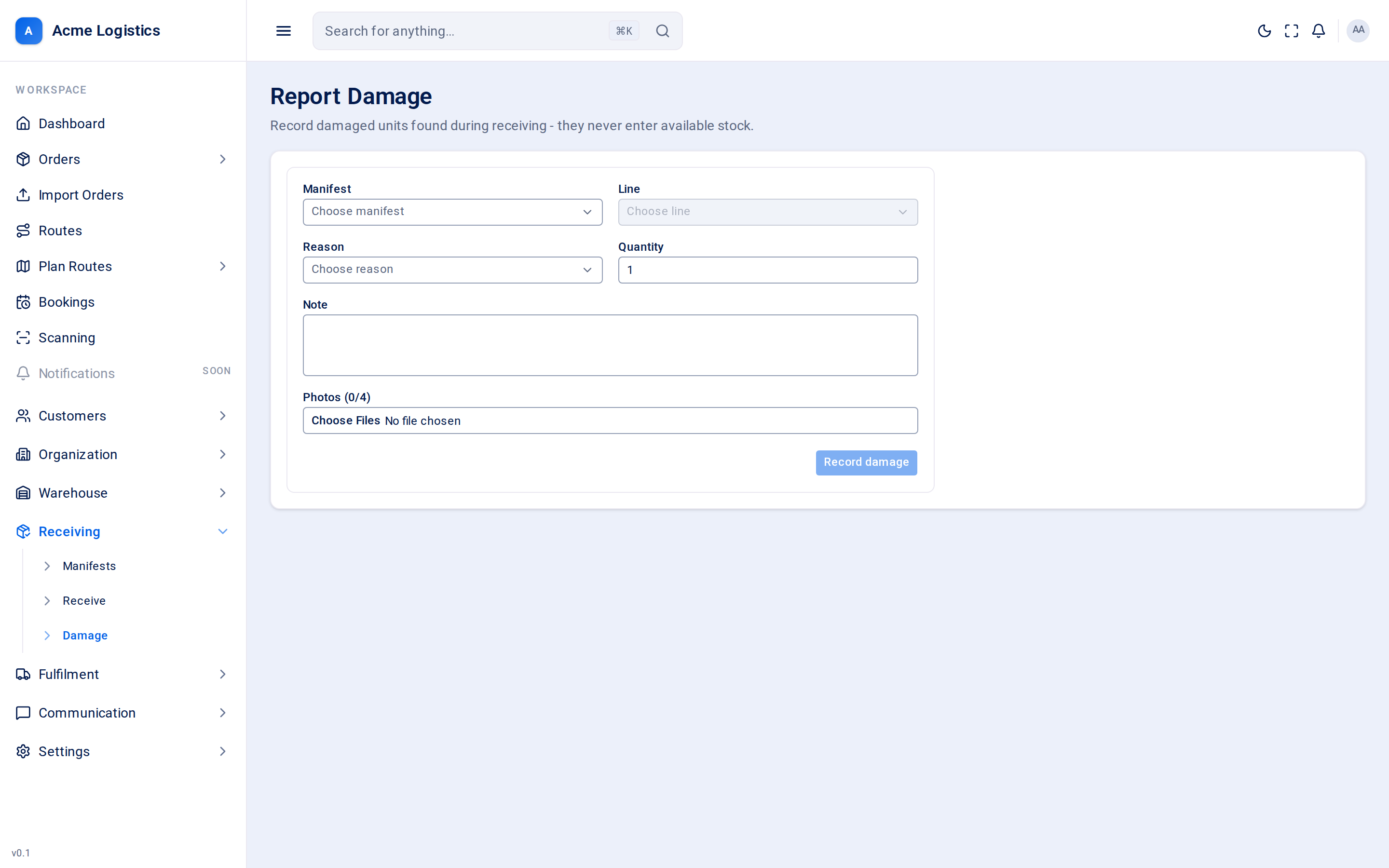
Where to find it: Receiving > Damage (the screen is titled “Report Damage”) Who can use it: you need the “Report receipt damage” permission, and the manifest must be for a depot you are allowed to see. For a product with box barcodes you also need the permission to receive manifests, because a damaged box can book a unit into stock.
When you use this
Section titled “When you use this”- A carton is crushed, wet or opened when it arrives.
- A unit is the wrong item or unusable and must not go into stock.
- You want photo evidence on file before the driver leaves.
Fields
Section titled “Fields”| Field | What it means | Required | Why it matters |
|---|---|---|---|
| Manifest | The delivery the damage came on. Only Pending and In progress manifests are offered. | Yes | Damage can only be recorded while the manifest is open. The emails go to this manifest’s customer and supplier. |
| Line | The product on that manifest that is damaged, shown as “Product #” and its internal ID. Disabled until a manifest is chosen. | Yes | The damaged quantity is added to this line’s Damaged count. |
| Box | Which box arrived damaged. Shown only for a product with box barcodes, numbered 1 to the product’s number of boxes. | Yes, for a product with box barcodes | Tracovy uses it to flag the unit that waits for a good box. See Products with box barcodes. |
| Reason | Why the units are damaged. Each reason shows its disposition in brackets: (shortfall) or (quarantine). | Yes | The reason’s disposition decides what happens to the stock. See Shortfall or quarantine. The reason’s name appears in the emails. |
| Quantity | How many units are damaged. Starts at 1. | Yes, a whole number of 1 or more | Adds to the line’s Damaged count. Damaged units never count as received, except for products with box barcodes (see below). |
| Note | Free text describing the damage. | No | Included in the damage emails, so write it for the customer to read. |
| Photos (0/4) | Up to four images (PNG, JPEG or WebP). | No | Stored with the damage record as evidence for a supplier claim. Photos are deleted automatically after a retention period (normally 7 days); the damage record itself is kept. |
Buttons and actions
Section titled “Buttons and actions”| Action | What it does |
|---|---|
| Record damage | Saves the damage record, updates the stock and the line’s Damaged count, and sends the emails. The note, photos and quantity are cleared so you can record the next one; the manifest, line and reason stay selected. |
Shortfall or quarantine
Section titled “Shortfall or quarantine”Every damage reason has a disposition. You cannot change it on this screen - it comes from the reason you choose.
| Disposition | What happens to the stock | Use it when |
|---|---|---|
| Shortfall | Nothing enters stock. The units are treated as never received - a shortfall against the manifest. | The units are being sent back on the truck, thrown away, or were never really there. |
| Quarantine | The units are added to the product’s Damaged stock at the manifest’s depot. They are kept on site but can never be allocated to an order. | You are holding the units for the supplier to inspect or collect. |
Either way, the line’s Received count does not change, except for products with box barcodes. Only good units count as received.
Products with box barcodes
Section titled “Products with box barcodes”When the line’s product has a barcode per box, pick the Box that arrived damaged. A damaged box is treated like a missing one:
- If a unit of the product at this depot is flagged “missing box K”, the oldest one becomes “box K damaged” instead.
- Otherwise the damaged box starts a new unit, flagged “box K damaged” and waiting for its other boxes too. That unit counts in Received.
A damaged box that starts a unit counts toward the line’s over-receipt limit like a good one: past the limit, Tracovy refuses the damage and records nothing. The unit stays in stock flagged “box K damaged” until a good box K arrives. Scan the good box on the Receive screen when it comes, on this manifest or a later one. The damaged box itself never counts as stock, so a quarantine reason moves nothing into Damaged stock; the record keeps the reason and disposition for the claim.
Emails
Section titled “Emails”Each damage record sends one email to the customer and one to the supplier:
- Customer / Manifest Damage (
customer.manifest_damage) to the customer’s Warehouse emails, or their Alert emails if that list is empty. - Supplier / Manifest Damage (
supplier.manifest_damage) to the supplier’s email, only when the manifest names a supplier.
The email contains a table with the SKU (and the box, such as “box 2”, for a product with box barcodes), quantity, reason, your note, and how many photos are attached to the damage record. The photos themselves are not attached to the email.
Recording damage on two lines of the same manifest sends two emails. You can change the wording or switch these emails off in Email templates.
Tips and common mistakes
Section titled “Tips and common mistakes”- Take the photos before the driver leaves - they are your evidence if the supplier disputes the claim.
- Pick the reason carefully: a quarantine reason puts units into Damaged stock that someone will later need to deal with on Adjust stock.
- If the Reason list is empty, no damage reasons have been set up for your company yet. Ask your Tracovy administrator.
- Do not also scan damaged units on the Receive screen. That would book them in as good stock.
Related
Section titled “Related”- Receive
- Manifests
- Manage stock - the Damaged column
- Notifications: which email is sent when