Regulatory details
Some countries’ telecoms regulators need to know who is behind a phone number before it may call or text - typically your business name, an address and sometimes documents. This screen collects those details for each country and sends them for approval. The questions come from the regulator through the phone provider, so each country asks for different things: some ask for several details, some for none.
Where to find it: Communication > Regulatory Who can use it: people with permission to manage billing and subscription - normally administrators.
When you use this
Section titled “When you use this”- You have just added a number in a country that needs regulatory details. You have 2 days from buying it.
- A number shows Awaiting carrier approval on the Numbers screen.
- The regulator declined your details or your documents have expired.
- You plan to add numbers in a new country and want to get approved first.
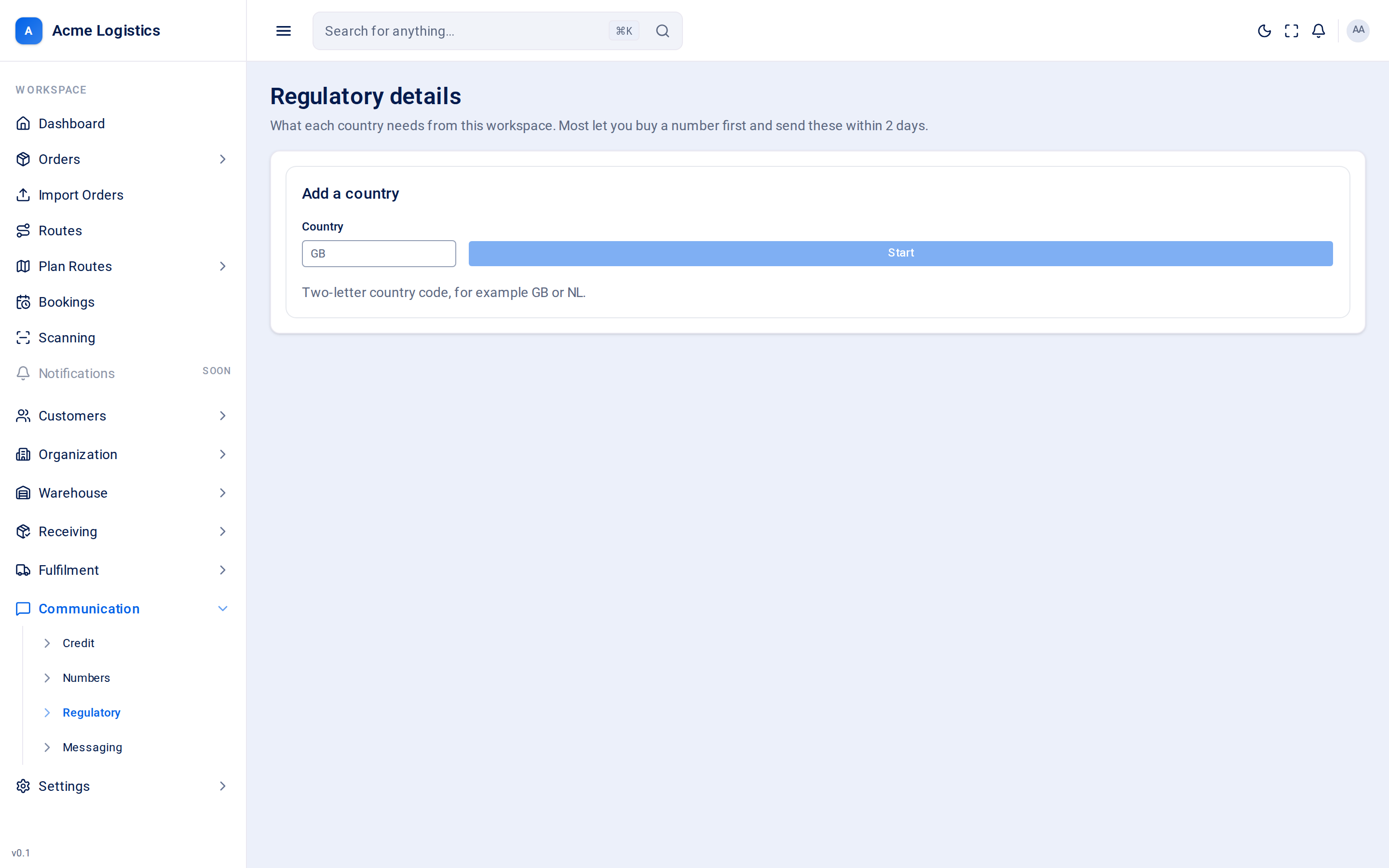
Add a country
Section titled “Add a country”| Field | What it means | Required | Why it matters |
|---|---|---|---|
| Country | Two-letter country code, for example GB or NL. UK is treated as GB. |
Yes | Tracovy checks what that country asks for as you type. |
The line under the box tells you the answer:
| Message | What it means |
|---|---|
| This country asks for no regulatory details. Nothing to do here. | You can use numbers there without this step. Start stays disabled. |
| (Country) asks for N details before a number can be ordered. | Click Start to create a card for that country. |
| Already started - the card below is this country’s. | You have a card already; fill that one in. |
A country card
Section titled “A country card”Each country you have started has a card. The heading shows the country, the kind of numbers it covers (Local numbers, Mobile numbers or Toll-free numbers), how many questions are answered (“3 of 5 answered”) and when they were sent.
The questions
Section titled “The questions”Each question shows its name, any extra explanation from the regulator, and one of these answer types:
| Answer type | How to answer | Notes |
|---|---|---|
| Choice | Pick from Choose one. | Saves as soon as you pick. Only the regulator’s own options are offered. |
| Text | Type the answer. The grey example shows the expected format. | A Save button appears once you change it. |
| Document | Upload a file. | PDF, PNG or JPEG, under 10MB. Make sure it is current - documents expire. |
| Address | Click Add address (or Change address) and fill in Business name, First name, Last name, Street address, City or town (all required), and optionally Unit or floor, County or state and Postcode. Then Save address. | The address the regulator will hold on file for your workspace. |
Answers cannot be changed while the details are with the regulator.
Buttons and actions
Section titled “Buttons and actions”| Action | What it does |
|---|---|
| Send for approval | Sends every answer to the regulator. Disabled until every question is answered (“Answer every question first.”). |
| Refresh (circular arrow) | Shown while waiting for the regulator. Checks for an answer now. Tracovy also checks on a schedule, so you do not need to keep pressing it. |
Statuses
Section titled “Statuses”| Status | What it means | What to do |
|---|---|---|
| Not sent | Started, not yet sent for approval. | Answer everything and click Send for approval. If you already bought a number here, you have 2 days from the purchase. |
| With the regulator | Sent and being checked. It usually takes a few days. | Wait. Nothing can be changed meanwhile. |
| Approved | Accepted. | Nothing. New numbers you buy in this country are filed against these details automatically, with no deadline. |
| Declined | Turned down. | Correct the answers and send them again. Any number you hold in this country is at risk until they are accepted. |
| Expired | Your documents have passed their time limit. | Upload current documents and send again. |
Tips and common mistakes
Section titled “Tips and common mistakes”- Start a country’s card as soon as you know you will buy a number there, so the 2-day deadline is never a race.
- Answers are checked by a regulator, not by Tracovy. Check them against your official documents before sending.
- The US, Canada and India may show “asks for no regulatory details” here, but a new number there still cannot send until its registration completes. The Add a number sheet warns you about this.